# Routage alertes avec Alerta<!-- .element: style="font-size:2em" -->
#### REX Alerta - PF-1135
27/09/2022
---
# Objectif POC
<section style="text-align: center;">

---
# Fonctionement Alerta
## Notion de base
### Plugins:
Deux types de plugins :
- [integrés](https://github.com/alerta/alerta/tree/master/alerta/plugins): forwarder, ,acked_by,reject,remote_ip,etc
- [alerta-contrib](https://github.com/alerta/alerta-contrib): enhance, geoip, rocketchat
### Customer:
- limiter le scope des utilisateurs
---
# Mise en place de la solution
<section style="text-align: center;">

---
# Mise en place de la solution
## Configuration alertmanager ocb-corp
```
envs: ["ocb-corp"]: configurations: "alertmanager-cloud-app": {
_alertmanagerFlavorMap: "cloud-app": receivers: [
am.#ReceiverWebhookConfig & {
name: "alerta"
webhook_configs: [{
send_resolved: true
url: "https://rancher.ocb-corp.caascad.com/k8s/clusters/c-dpsfb/api/v1/namespaces/pf1135-alerta/services/pf1135-alerta:80/proxy/api/webhooks/prometheus?api-key=SdK685a880cqjfkPqozW4NHbw0rlbJI_vg-WGo7F"
http_config: {
authorization: {
credentials: "concourse-infra-pipelines-prdcasa:T2q8u2cuTvhjQxeZ6T76aj7q1AQk17sTQGdDrqG4vrL8IuB1A8GVdGFlPGBKRNCr"
}}}]}]}
```
---
# Mise en place de la solution
## Configuration alerta (alert-receiver)
```yaml=
alertaConfig:
LOG_LEVEL: "DEBUG"
BASE_URL: "'http://alerta-truesight.alerta-truesight.svc.cluster.local:80'"
PLUGINS: "['normalise', 'enhance','forwarder']"
FWD_DESTINATIONS: "[
(
'http://pf1135-alerta.pf1135-alerta.svc.cluster.local:80/api',
{'key':'9LjPj6wIb-YGc2rddGKkCLM13rkh_8ivj3Qq7nfj', 'ssl_verify': False},
['*']
),
]"
```
---
# Custom plugin
Besoin de créer un plugin custom, car les plugins existants ne remplissent pas les fonctions suivantes: <!-- .element: style="font-size:90%" -->
- mapping API Keys <!-- .element: style="font-size:70%" -->
- retour code http/message provenant d'AlertReceiver (destination) vers Alertmanager (source) <!-- .element: style="font-size:70%" -->
---
## Installation plugin - partie 1
Alerta est construit pour qu'il aille chercher les plugins sur Internet dans [alerta-contrib](https://github.com/alerta/docker-alerta/blob/master/install-plugins.sh)
### Étapes:
1. Création fichiers dans le répertoire `plugin` ( `alerta_afterword.py` et `setup.py`)
2. Création d'une configMap qui contient les deux fichiers (` kubectl create cm pf1135-alerta-plugin --from-file plugin/ -n pf1135-alerta`)
---
## Installation plugin - partie 2
3. Monter un volume avec le contenu du configMap (`templates/deployment.yaml`)
```
volumeMounts:
- name: alerta-plugin
mountPath: /srv/afterword/setup.py
subPath: setup.py
- name: alerta-plugin
mountPath: /srv/afterword/alerta_afterword.py
subPath: alerta_afterword.py
volumes:
- name: alerta-plugin
configMap:
name: pf1135-alerta-plugin
```
---
## Installation plugin - partie 3
4. Installation avec l'environnement python d'Alerta (`templates/deployment.yaml`)
- jouer sur le timing: Alerta attend que la connexion avec la base de données soit up avant d'entrer dans son entryPoint qui va initialiser ses plugins, on aura eu le temps d'installer notre module Python dans l'environnement Alerta (/venv/lib/...)
- pas des permissions d'execution dans le mountpoint `/srv/afterword`
```
lifecycle:
postStart:
exec:
command: [ "/bin/bash","-c","mkdir /tmp/plugin && cd /tmp/plugin && cp /srv/afterword/*.py /tmp/plugin && /venv/bin/python setup.py install ; exit 0"]
```
---
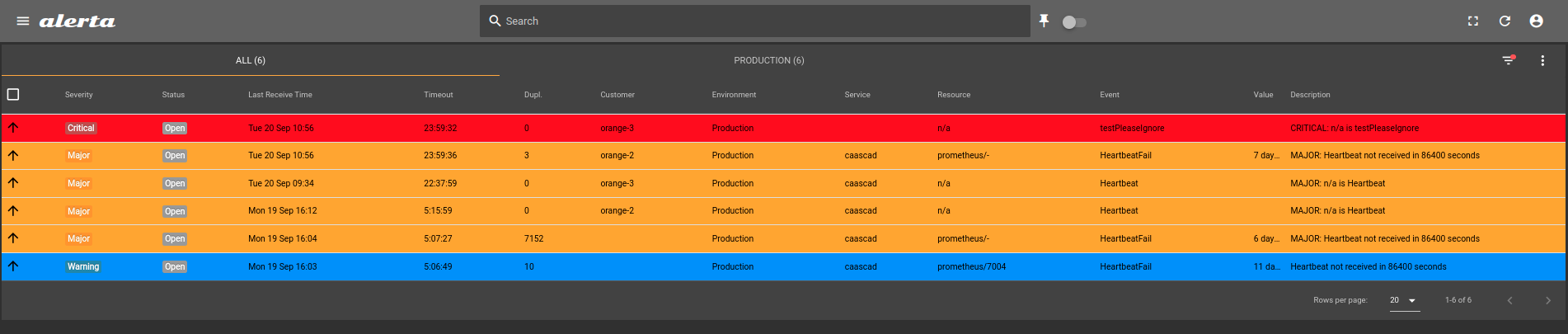
# Fonctionalité #1 - API Key Mapping
Fonctionalité obtenue avec le `customer_view`.

| Alerta (API Key) | Customer | Destination (API Key) | | |
|---|---|---|---|---|
| API Key#1 | orange-1 |API Key #1-DEST | | |
| API Key#2 | orange-2 |API Key #2-DEST | | |
| API Key#3 | orange-3 | API Key #3-DEST | | |
---
# Configuration Alerta (`values.yaml`)
- activation authentification (requise par `CUSTOMER_VIEWS`)<!-- .element: style="font-size:50%" -->
- provisioning alertaAdminKey/alertaApiKey (requise par `AUTH_REQUIRED` car AlertaCLI doit aussi provisionner); <!-- .element: style="font-size:60%" -->
```
alertaConfig:
PLUGINS: "['afterword']"
AUTH_REQUIRED: "True"
CUSTOMER_VIEWS: "True"
KEYSMAPPING: "[{'orange-1': 'SaWlyxdQAEKRY85nVONmXR74H3UipDh0bK0RU57f', 'orange-2': '2yJOZ1o8Nwn7vK_VQ5shmHXGzlMM3_uiPAtaoCb1','orange-3':'TwnbQEWTxvJC7ldjyqTsVx1gSa1-R2j4p_RF5cHw'}]"
FWD_REMOTE: 'http://alerta-truesight.alerta-truesight.svc.cluster.local:80/api'
alertaAdminKey: "SaWlyxdQAEKRY85nVONmXR74H3UipDh0bK0RU57f"
alertaApiKey: "SaWlyxdQAEKRY85nVONmXR74H3UipDh0bK0RU57f" # Alerta CLI
```
---
# Alerta View - API Key Mapping
---
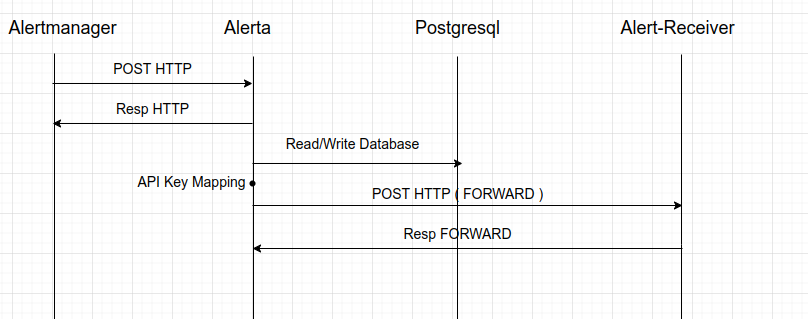
# Fonctionalité #2 - Réponse HTTP
## Fonctionnement Alerta
---
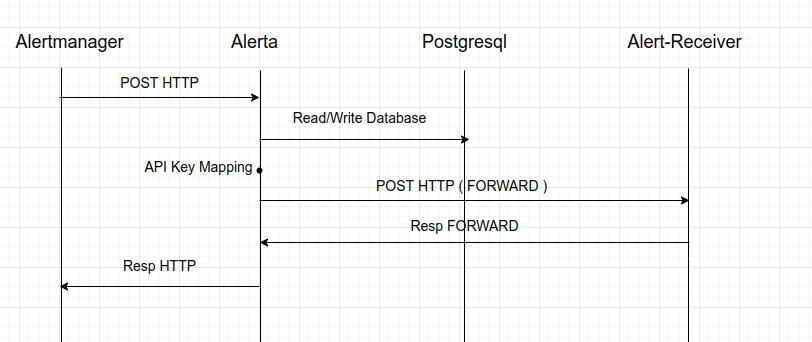
# Réponse HTTP
<section style="text-align: left;">
## Mode de fonctionnement souhaité
---
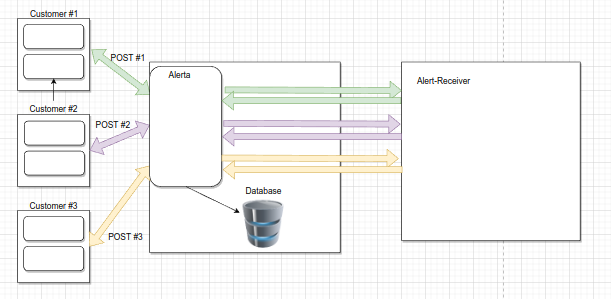
# Difficultés mode de fonctionnement cible - partie 1
- Alerta doit garder la connexion avec Alertmanager pendant toutes les autres etapes (mapping, forward, reponse,correlation avec le POST HTTP)<!-- .element: style="font-size:60%" -->
- Possibilité de DoS http si Alert-Receiver n'est pas joignable (attente du timeout)<!-- .element: style="font-size:60%" -->
<!-- .element: style="font-size:50%" -->
---
# Difficultés mode de fonctionnement cible - partie 2
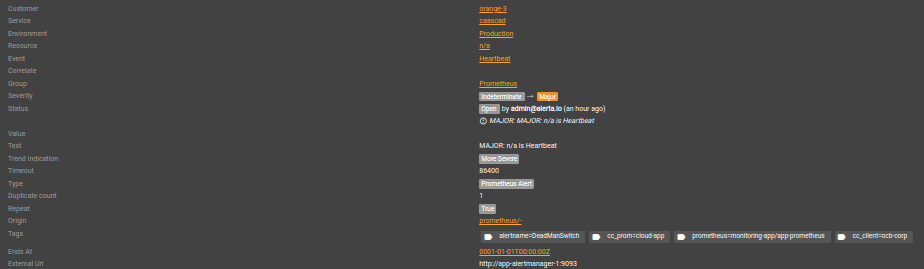
- Le POST initial ne contient pas l'adresse source (`http://app-alertmanager-1:9093`, `
alerta/alerta-truesight-5868bdffc6-g7lpl`) => elle peut être construite par le Customer view qui ajoute un tag dans Alerta <!-- .element: style="font-size:60%" -->
---
# Piste
Pre-receive: gérér l'alerte avant l'écrire dans la base
Example: https://github.com/alerta/alerta/blob/master/alerta/plugins/reject.py
---
# Pros et cons
<section style="text-align: left;">
## Inconvenients
- **Difficile de le faire *transparent* entre Alertmanager et AlertReceiver**
- Construit pour forwarder vers un autre Alerta
- Plugins integrés assez limités
---
# Pros et cons
<section style="text-align: left;">
## Avantages
- Alerta est facile à installer/configurer et a une base de donnés dédiée
- Les fonctionalités peuvent être enrichies avec l'aide des plugins
- Mapping API Key possible
- Format d'alerte flexible
- Multiples [integrations](https://docs.alerta.io/integrations.html): Grafana, Prometheus, Amazon Cloudwatch, etc
- Gérer de multiples clients à l'aide d'une seule instance d'Alerta (via `customer view`).
---
# Liens
<section style="text-align: left;">
- [GitHub Alerta](https://github.com/alerta)
<style type="text/css">
p {
font-size: 0.7em;
}
.reveal ul li {
font-size: 0.7em;
}
.reveal ul ul li {
font-size: 0.5em;
}
.reveal section {
text-align: left;
}
}
.reveal h3 {
color: orange;
text-align: center;
border-bottom: 1px solid orange;
font-size: 0.4em;
}
.reveal h1 {
color: orange;
text-align: center;
border-bottom: 1px solid orange;
margin-bottom: 0.4em;
font-size: 1.5em;
}
.reveal table tr th {
font-size: 0.7em;
}
.reveal table tr td {
font-size: 0.5em;
}
.reveal code {
color: aquamarine;
font-size: smaller;
}
.prez-slide-tests-roles-grafana p {
font-size: 0.9em;
margin: 0;
}
.prez-slide-tests-roles-grafana table tr th {
font-size: 0.5em;
}
.prez-slide-tests-roles-grafana table tr td {
font-size: 0.4em;
}
.prez-slide-tests-roles-grafana code {
color: aquamarine;
font-size: 0.6em;
}
.prez-slide-tests-roles-grafana h1 {
font-size: 1.2em;
}
</style>